Pegbox™
a visual kit for sounds

Hang your sounds where you can see them.

A visual kit for the sounds you use most. Every effect is a picture on a tile, not a filename in a list. Hunt by eye, audition on press, and land it in the session from the SPOT lip. Spot to Pro Tools. Drag anywhere else.

Try the WorkspacePlay the SamplerSound on, and click once to enable audio. The tiles and pads below play real sounds from a working library, at web quality.
Press SPOT on a tile and it lands here, at the cursor, on the track that category is bound to.
The loop

Two gestures. That is the whole app.

You already know which sound it is and which track it belongs on. Everything Pegbox does is remove the steps between those two facts.

Gesture one
Press the picture. You hear it.

About 9 ms from the press, at a matched level against every other bed in the kit. You are comparing sound to sound, not level to level, and nothing has to load first.

Gesture two
Press the SPOT lip. It is in the session.

At the insertion point, named, at the level you just heard. No import dialog, no folder to choose. Pro Tools today.

The pegboard on top

The sounds this show never stops asking for go on the pegboard. Drag them up, they stay there. One show ends, you clear the board and hang the next one.

Hunt by picture

Every sound is a tile with its own image, in color-coded categories you build. No more reading UCS filenames to find the door you used Wednesday.

Land on the right track

Assign a destination track per sound or per category. Spot ignores whatever happens to be selected in the session.

Perform to picture

Record starts playback in Pro Tools. Spot stops playback and commits the file at the insert point. No track arm. No MIDI map.

The Workspace

Pick a category, press a tile, hit S.

This is the Workspace as it looks on the Mac, loaded with a slice of a real library: the same sidebar, the same tiles and pictures, the same one-key spot. Categories bind to Pro Tools tracks, so a gun lands on the gun track. Pin what a project keeps reaching for onto the Pegboard.

Pegbox
14
Show clip groups
+ Add Category
Plugins Closed Window Bypass
Exterior Nature & Birds
S spotSpace replayEsc stop←→ selectP pin · drag a tile onto the Pegboarddrag a tile into any editor · file goes with it

⚙︎● Pro Tools · EP104_R3_SFX· trigger 8 ms
36%
The Sampler

Any take becomes a kit. Play it to picture.

Foley artists who record on their own stage and cut the track in Pro Tools: hang the takes you reuse, hunt them by picture, play the ones that have to hit, and spot them onto the FS, PROP and CLTH tracks you already deliver. The mixer gets a built Foley track. You stop digging through take_14b.

Drop a recording and Pegbox slices it at every hit. This panel is the real thing: your Keyboards and Cameras kits, sliced live in the browser from the original recordings. Drag the level line to keep only the strong hits. Play from the keyboard, a MIDI controller or the iPad, record the performance, and spot the take. The button that ends the pass is the one that commits it.

Pegbox
Pad 1 · Keyboard typing relax
Threshold
Sensitivity
Min gap
Decay
Pre-roll
Volume
🎹 All MIDI inputs ▾
+ Add Kit
TRANSPORTPRE-ROLL 2s   TAKE 0.0s
Ready · click a pad, or press Z X C V · A S D F
⚙︎● MIDI controller16 voices · 0.5 ms onsets
36%

Record into Pro Tools without arming a track.

For the sounds that have to hit picture: footsteps, cloth, props, typing, a phone grab, a fight. Record them once on your own stage, then play the sounds to the scene in Pegbox — take after take, no re-recording.

● RECPro Tools rolls

Hitting record in Pegbox starts playback in the session. Picture runs.

▶ PADSYou perform the hits

Computer keyboard, a MIDI controller, the iPad, or the mouse. Whatever is in your hand.

⬇ SPOTPro Tools stops

The same key that ends the pass is the one that commits it. One gesture, not two.

■ DONEThe pass is on the timeline

At the insertion point, on the track you assigned — FS, PROP, CLTH, whatever you deliver. The same session you hand the mixer. No record arm, no input routing, no MIDI map.

For music editors

See the whole cue. Click the moment. Spot it in.

A theme, a whoosh sting, an outro — still sounds, but a three-minute cue doesn't fit on a picture tile. Stacks is the list view built for exactly that: every cue with its full waveform, right there to scan. Click into it to find the hook or the downbeat, then SPOT lands that exact moment at the cursor — same lip, same one gesture. Key, tempo, time signature and who scored it sit in the row, because those are the questions a music editor actually asks.

Cues often ship with stems, not just a mix. Expand one and every stem lines up underneath — mute or solo any track, scrub them in sync against the full mix, and SPOT sends exactly what's soloed, or the full mix, to the cursor.
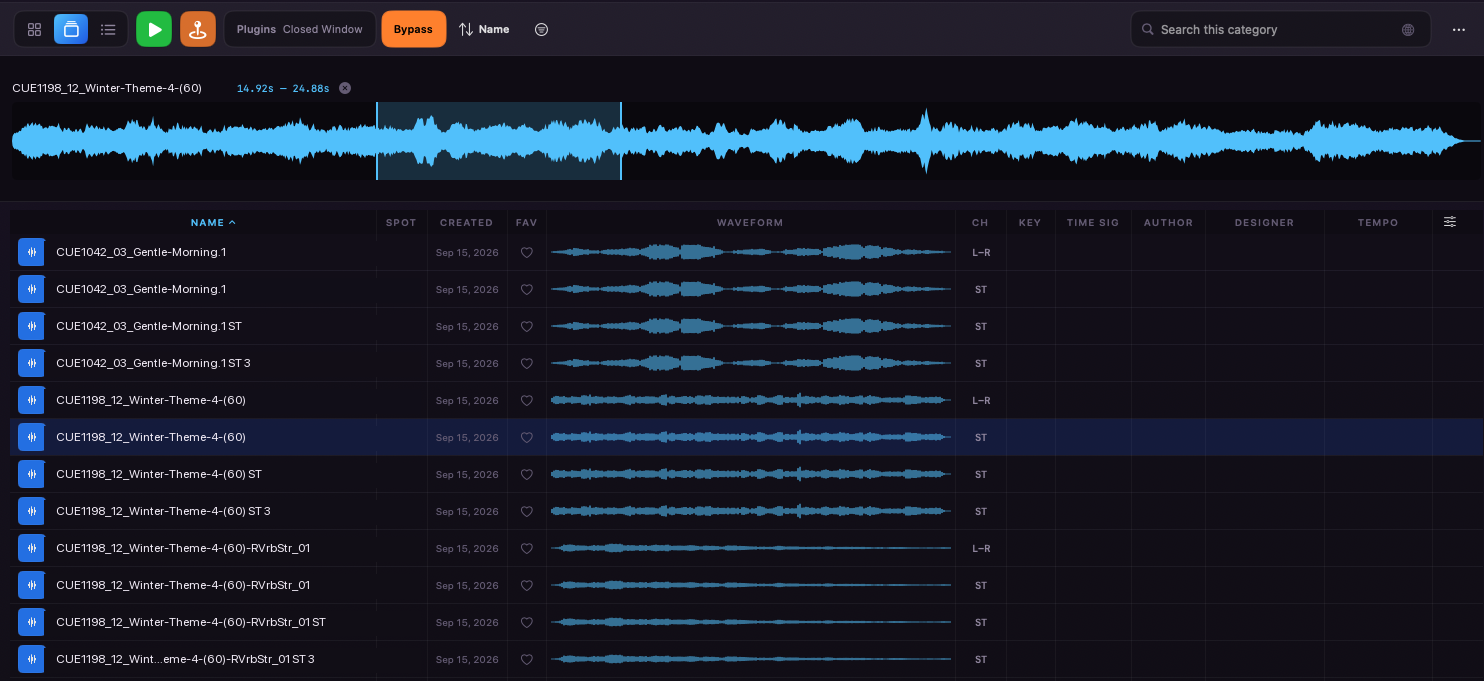
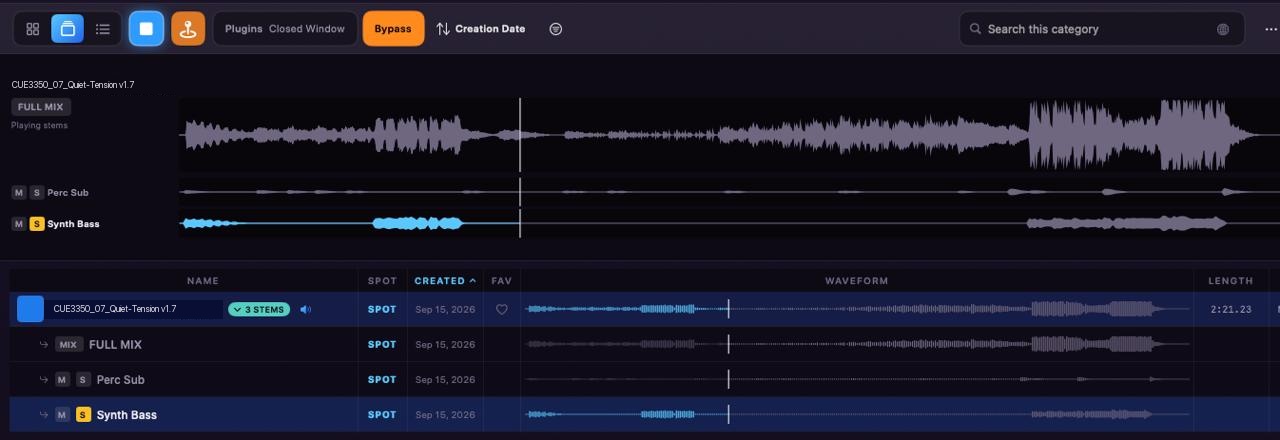
Pegbox's Stacks view: a list of music cues with full waveforms, a selectable time range, and Key, Time Sig, Tempo, Author and Designer columns A cue expanded into its stems in Pegbox's Stacks view, each with mute and solo, waveforms scrubbing in sync
Hunt by image, not by text

A library you recognize at a glance.

Filenames are precise and unreadable. Pegbox turns each one into a picture. It ships with a photo album of pictures and icons already drawn for the things a show asks for over and over: doors, rooms, cars, phones, footsteps, weapons. Pick one and the tile is done. Every picture below is a real tile from this library.

When the album does not have the door you mean, draw your own. Illustrate a whole category automatically from the filename and embedded metadata, or write a prompt for one tile, with your own OpenAI or Gemini key: about a dollar per 200 tiles with OpenAI, about eight with Gemini. No key and the photo album still covers the board.

1Pick from the photo albumPictures and icons that ship with the app, sorted the way sound is. No key, no cost, no waiting.
2Or draw your ownYour key, your prompt, your image. One tile or a whole category, from the filename and metadata.
Exterior Nature & Birds · City Ambiences · 6 files

Prompts built from filename + BWF description · six tiles cost $0.03 with OpenAI gpt-image-1-mini at low quality ($0.005 each) or $0.23 with Gemini 2.5 Flash Image ($0.039 each). The app shows the price and asks before it spends.

RealisticPhoto-real scenes for beds and rooms. The default for ambiences.residence roomtone
ObjectThe thing itself, isolated and lit like a product shot. Doors, cameras, phones.cameras
FightComic-book action so a block, a punch and a body fall read at button size.fight
FileCity Park Environment.wav Folder/Volumes/SFX Drive/Ambiences/Exteriors Length01:04 · 48k · ST CategoryExterior Nature & Birds · realistic
→
$0.005 OpenAI · $0.039 Gemini
→
City Park Environment
Who it's for
Sound editorsKeeping a show kit across an episode, a season, a series.
Foley artistsWho record, cut, and deliver their own tracks to the mixer.
Music editorsWho need the hook or the downbeat, not the whole cue.
AnyoneWho would rather hit a picture than read a filename.
Straight talk

What Pegbox is, and what it isn't.

Pegbox is not Soundly, SoundQ or Soundminer. Keep those for discovery. Pegbox is the tray you reach for after a sound has already earned its place in the show.

✓Pegbox is

  • A visual kit for the 200 to 2,000 sounds you actually reach for, sorted your way.
  • One lip from the cursor. SPOT lands the tile at the Pro Tools insertion point, named and gain-matched. Native spot for other editors is on the roadmap; today they take the drag.
  • Matched-loudness audition. Beds play at a common reference level, so you compare content, not levels.
  • A performance sampler for hits you play to picture: footsteps, cloth, props, typing, cameras, gun bursts.
  • For Foley artists too. For Foley artists who record their own material, build the Foley tracks in Pro Tools, and send them to the mixer — the shoes, cloth and props this show will ask for again.
  • For music editors too. Themes, stings, outros — still sounds, just longer. Stacks shows the full waveform, click the moment you need, SPOT lands it at the cursor.
  • A photo album in the box. Pictures and icons ship with the app. Generating your own with an OpenAI or Gemini key is the optional extra, not the price of entry.
  • Local and yours. Native Mac app, no account, no cloud, one library file on your disk.
  • Remote from an iPad. Browse, audition, spot and play pads from the couch. Mac and iPad on the same Wi-Fi; the iPad needs a licensed Mac.

✕Pegbox isn't

  • Not a search engine. Soundly, SoundQ and Soundminer are for discovery. Pegbox is for what has already earned its place.
  • Not a file manager. It never moves, renames or alters your originals. What it writes — a spotted copy, an exported range — is always a new file, and deleting a tile leaves yours where it is.
  • Not a plug-in. It runs beside your editor. Pro Tools gets a direct spot; everything else gets a drag. No AAX, no bus tricks.
  • Not a subscription. One purchase. The optional AI tools use your own API keys at cost.
  • Not a text search tool first. Search exists and works everywhere, but the picture is the index.
  • Not a music sampler. Slices are for sound effects hits, not tuned instruments.
  • Not a replacement for walking a scene. It is the board for the takes you already recorded and will cut again.
Side drawers

Four AI tools for the rest of the job.

Each lives in its own tab, uses your own ElevenLabs key, and delivers 48 kHz / 24-bit WAV you can drag onto a track or spot with one click.

SFX Generator

Describe the sound, get up to four takes as they land. Duration, influence and seamless loop controls.

› heavy iron gate, slow creak, distant yard, night
4 takes · 3.2 s · WAV

Voice Generator

Type it, speak it, or re-voice a reference file. One-click delivery tags drop straight into the script.

whisperswe shouldn't be here. excitedlook at that!

Voice Isolator

Drop a noisy dialogue file, get the clean vocal back, conformed and ready to spot.

hover: noisy → clean

Transcribe

Speaker-labeled transcripts with a synced player. Point a watch folder at your bounces and every new file transcribes itself.

Did youlockit?Twice.Checkthetrunk.

Bring your own keys. ElevenLabs, OpenAI and Gemini keys live in the macOS Keychain and talk to those services directly. Pegbox has no backend, no markup and no account of its own.

Additional features
Pegbox Remote for iPadConnects to the Mac over the same Wi-Fi. Same tiles, same pads, a SPOT lip on every tile. iPadOS 17 or later; needs a licensed Mac.
Hear it indoorsInsert your own Audio Units. Save "Closed window" as a preset. Spot bakes the chain into the clip.
Press-to-play, ~9 msHovering pre-decodes the file, so the press itself is instant. The status bar shows the real number.
Drag into any editorPremiere, Nuendo, Reaper, Resolve, Cubase, Logic, Final Cut Pro, or anything that takes a drop. The original file goes with it.
Multichannel safe5.1, LCR and quad files fold down correctly for audition and land intact when spotted.
SoundFlow readyA command line entry spots any tile by a stable ID, so macros can drive the board.
Pricing

One purchase, and a free version to start with.

Pegbox is a one-time purchase from Gumroad: $149, no subscription. Without a key it runs as the free version: every feature works, with limits on how much you can add. Nothing you already have is ever locked.

3 categories, 8 sounds eachThe free Workspace. Past that, adding more asks for a key.
2 Sampler kits, 2 filled pads eachEnough to play with the slicer and the pads.
4 runs of each AI toolSFX Generator, Voice Generator, Voice Isolator and Transcribe. Failed or cancelled runs don't count.
iPad needs a licensePegbox Remote, from the App Store, connects only to a licensed Mac.
3 Macs per keyPaste the key from your Gumroad receipt into Pegbox ▸ Unlock Pegbox….
Activation contacts GumroadUnlocking checks the key with Gumroad, and Pegbox checks again about once a month when it's online. Offline, nothing is ever locked.
Buy Pegbox — $149Download freeSame download either way: pick Pegbox — Free on the Gumroad page to start without a key.

One-time purchase, no subscription · Refunds: within 30 days, no questions asked · License agreement · Privacy policy · Everything about keys, Macs and the free version is in the manual.